

You’re a construction project manager managing multiple construction projects at once. Your phone is buzzing nonstop with calls and WhatsApp messages from your site engineers, office teams, and clients.
The latest drawings are in someone’s Google Drive folder you can’t access, and a change order got buried in an email thread. By the time you gather all the pieces, the project is already behind schedule and over budget.
Here, you don’t have a tool problem; you have a visibility problem. And that’s where building construction project software comes in: giving you clarity across planning, execution, documentation, and change orders in one platform.
Why Building Construction Project Software Matters for Managing Construction Projects?
Building construction project software helps construction teams plan, manage, and track projects in one place. Instead of relying on scattered tools, it brings schedules, documents, costs, tasks, and team communication together so everyone works with the same information and can monitor progress clearly.
When construction projects are handled through emails, calls, spreadsheets, or separate estimating tools, updates get missed, and problems surface late. Routine tasks take longer, cost estimation becomes harder to control, and teams spend more time chasing information than delivering results.
Construction project management software improves visibility by showing real-time progress, budgets, and changes as work moves forward. Used by construction business managers, project managers, general contractors, builders, and field teams, this software supports smoother coordination across job sites and office teams.
The sections ahead break down how these tools fit into day-to-day construction work, what features matter most on real job sites, and how the right software supports stronger project outcomes and business growth.
Key Takeaways
- Construction projects often fail due to poor communication, scattered documents, and missed deadlines.
- Modern construction management software centralizes everything: documents, tasks, progress tracking, costs, and collaboration tools.
- Adoption works best when software is built for how construction teams work, not just dashboards.
- Real-time insights, automated workflows, and visibility across the project lifecycle improve cash flow, reduce errors, and save time.
See How Your Construction Projects Can Stay on Track, With Construction Project Software Track Every Step of the Way.
What Is Building Construction Project Software, and What It Should Actually Do?
At its core, construction project management software is one platform that connects planning, people, documents, tasks, and change orders. It’s designed for how construction work really happens, not how spreadsheets imagine it.
Construction Project Management vs General Construction Software
- Generic construction software creates silos and complicates collaboration.
- Project-centric software aligns project teams, job sites, office teams, and clients on the same page.
- Real-time insights help project managers make informed decisions quickly.
Why Construction Projects Still Struggle With Visibility, Even With Existing Tools?
Even with construction management software and multiple digital tools in place, many construction projects still struggle with day-to-day visibility. The issue usually isn’t a lack of tools, but the way project information is spread across systems that don’t work well together.
1. The Real Cost of Poor Visibility Across Construction Phases
Lack of clarity can be expensive:
- Missed deadlines delay client approvals and stall cash flow.
- Budget overruns occur when material costs or labor hours aren’t tracked in real-time.
- Rework skyrockets due to outdated drawings or miscommunication. Industry reports show that up to 15% of construction project costs are wasted on rework caused by poor visibility.
- Phone tag and endless email threads waste hours of productivity for site and office teams.
2. Where Traditional Construction Management Software Falls Short
Many existing tools promise control but fail on the ground:
- Built primarily for reporting rather than execution.
- Disconnected modules that force teams to use multiple platforms.
- Data is entered but rarely leveraged. Managers see dashboards; teams see confusion.
To overcome this, you should also be aware of the latest trends in construction management, AI, mobile tools, and sustainable workflows, which are shaping how projects maintain visibility these days.
How Construction Project Management Software Brings End-to-End Workflow Clarity?
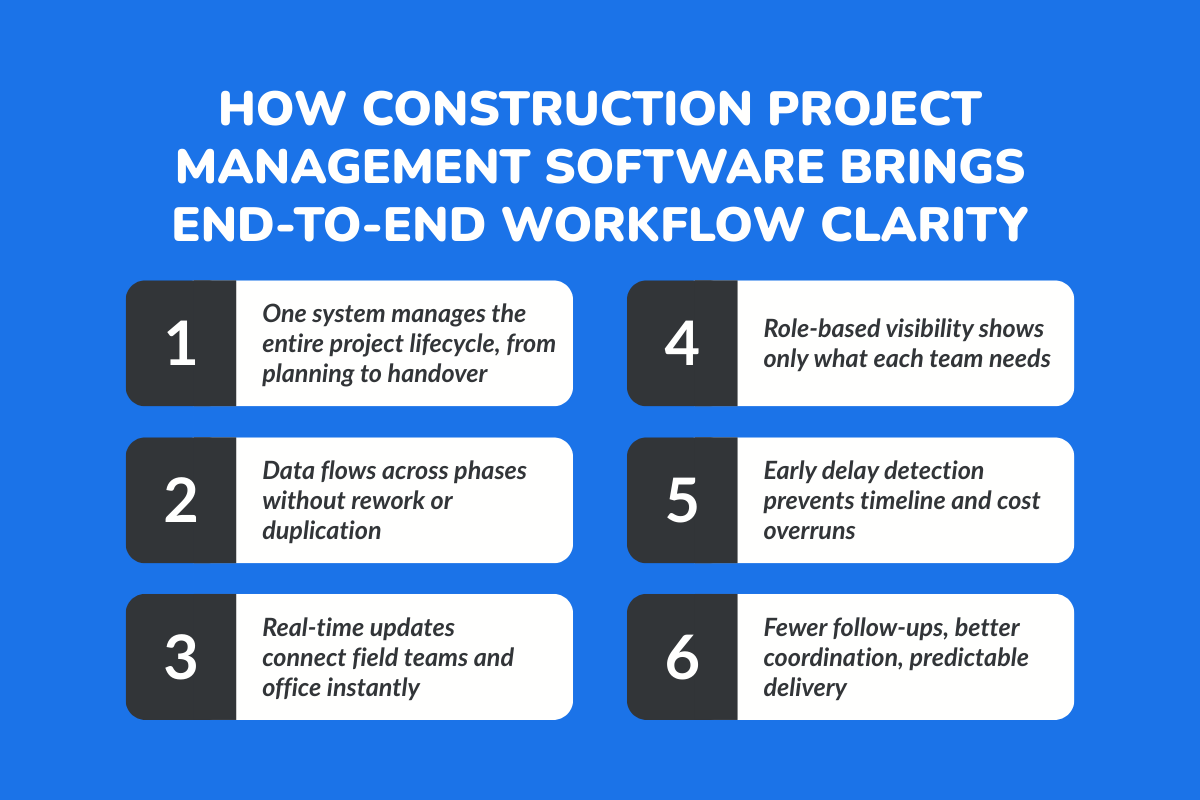
1. From Pre-Construction to Handover: One Continuous System
The strongest construction software supports the full project lifecycle without breaking it into disconnected parts. Work that begins in planning naturally carries forward into execution and close-out, without data being re-entered or decisions being revisited.
A. Planning: Tasks, budgets, and timelines are defined early, giving project teams a clear starting point and shared expectations. For example, a project manager sets milestones once, and the same timeline carries through execution without rebuilding schedules later.
B. Resource Allocation: Field teams, builders, and specialty contractors are assigned based on availability and project needs, reducing last-minute adjustments. Instead of calling three supervisors to check availability, assignments are visible and updated in one place.
C. Execution: Teams track progress, monitor quality, and share updates as work happens, not days later. A site engineer uploads photos from the job site, and the office team sees the update immediately.
D. Monitoring: Gantt charts, daily reports, and time tracking show how the project is actually moving, helping teams spot delays before they grow. When a task slips by a day, the impact on the overall timeline is clear before it becomes a bigger problem.
E. Close-Out: Approvals, change orders, and financial reconciliation follow the same system, making project completion more predictable and less stressful. Final documents and sign-offs are already organized, instead of being searched for at the last minute.
2. Visibility Which Isn’t Just a Dashboard: It’s Context
True visibility is about seeing the right information at the right time. A site engineer doesn’t need cost breakdowns, and a project manager doesn’t need to chase site updates through phone calls.
- Good construction project management software delivers context. It shows each team member what matters to their role, in a format they understand.
- Field teams focus on today’s tasks, office teams track costs and schedules, and managers see progress without interrupting anyone.
- That shared clarity is what keeps projects moving forward without constant follow-ups, confusion, or phone tag.
Core Features That Matter in Real Construction Projects, Not Marketing Demos
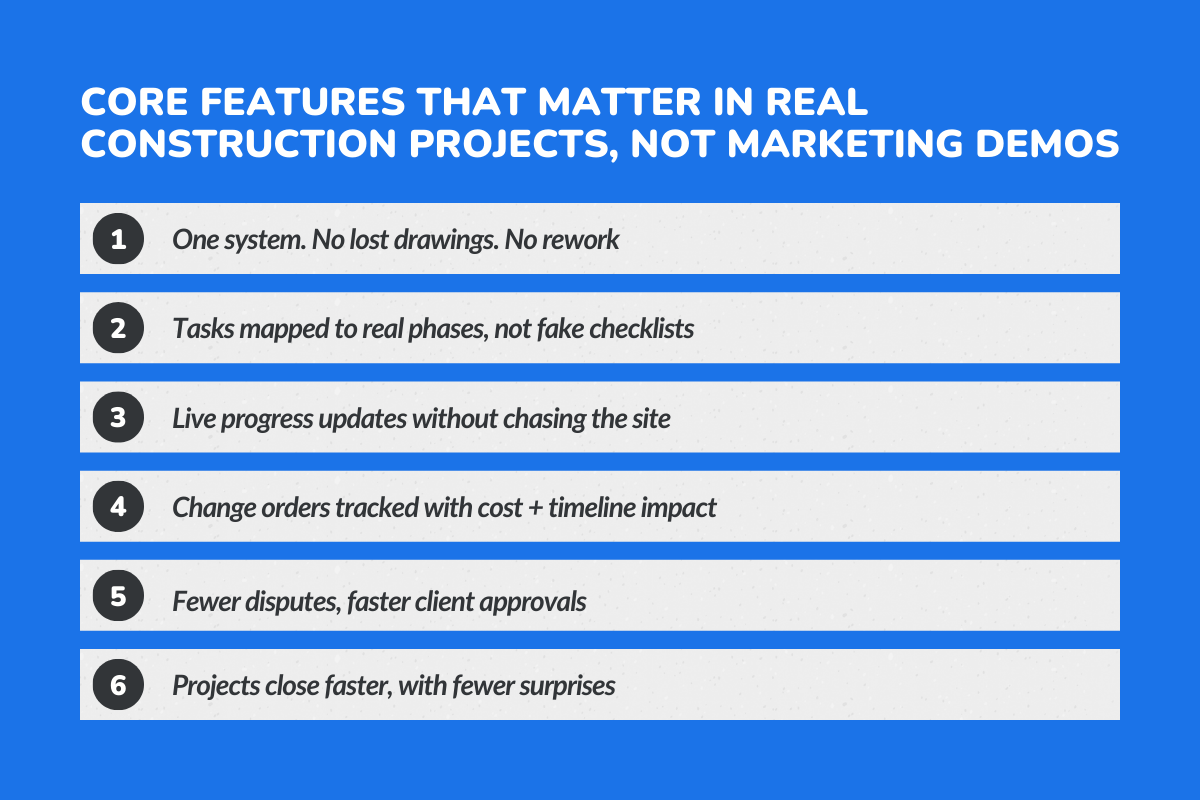
1. Centralized Document Management for Construction Teams
On a real job site, confusion usually starts with documents. Someone is working from an outdated drawing. A revised structural plan was emailed, but never uploaded. A permit version gets mixed up. Small miscommunication turns into rework, delays, and frustration.
Centralized document management solves this by creating one reliable source of truth. Everyone, from project managers to site engineers to subcontractors, accesses the same updated drawings, contracts, and approvals.
2. Task & Phase Tracking Across Construction Projects
Construction projects don’t move in random checklists. They move in phases—foundation, framing, electrical, finishing, and each phase depends on the one before it. When tasks aren’t linked to real project stages, work appears “done” but isn’t actually complete.
Effective task and phase tracking ties daily activities to larger milestones. Teams can see what’s finished, what’s pending, and what’s blocked.
3. Change Orders Without Panic or Delays
Change is part of construction. What creates chaos is not the change itself, but how it’s handled. When change orders are managed through emails and spreadsheets, approvals get delayed, costs aren’t updated correctly, and timelines shift without clarity.
A strong system tracks change requests formally from submission to approval to cost and schedule impact. Clients can see exactly how the change affects the budget and delivery date. Daily reports reflect updates automatically.
How Construction Teams Actually Use Software on the Ground?
1. Site Engineers: Faster Decisions, Fewer Phone Calls
For site engineers, time is everything. When a drawing is unclear or a specification changes, they cannot afford to wait hours for confirmation. On the ground, software becomes their instant reference point.
Instead of calling the office to confirm the latest plan revision, they pull it up directly. They log progress updates, upload site photos, and flag issues in real time.
2. Project Managers: One Source of Truth
Project managers operate at a higher level, but their biggest risk is fragmented information. When updates come from emails, calls, and handwritten notes, visibility disappears.
With centralized software, they see task progress, pending approvals, material status, and change orders in one place. Instead of chasing updates from multiple teams, they monitor dashboards that reflect live site activity.
If a phase is slipping, they know early. If a subcontractor is delayed, they can reallocate resources before the impact spreads. The software becomes their control panel, clear, structured, and reliable.
3. Business Owners & Directors: Control Without Micromanagement
Owners and directors don’t need to see every small task. They need visibility into performance, margins, and risk. Without software, that visibility often depends on periodic reports or verbal updates, which are usually delayed.
Modern construction systems give leadership real-time summaries of budgets, timelines, and project health. They can see whether projects are on track, where costs are rising, and which teams are overextended.
Why Young Construction Teams Expect Better Tools Today?
Information from one project moving through WhatsApp groups, calls, and photos creates noise instead of clarity. Important updates get buried fast.
1. Moving Beyond Paper, Excel, and WhatsApp
- Most young site engineers and project coordinators start their day on a phone, not a desktop. Waiting till evening to “update Excel” already feels outdated.
- Teams expect project data to update as work happens, not days later in a report.
- When software feels slow or complicated, people quietly stop using it and fall back to what’s familiar.
2. Software Adoption Is a UX Problem, Not a Training Problem
- No one wants another training session just to log a task or upload a photo.
- If a tool can’t be used comfortably on-site, it won’t be used consistently.
- Simple screens, clear actions, and minimal typing make daily updates realistic.
- Sharing photos, tracking time, and updating progress should feel natural, not like extra work.
- When software fits into how teams already work, adoption happens on its own.
What to Look for When Choosing the Best Construction Management Software?
1. Questions You Should Ask Before Buying Any Tool
- Does it cover the full project lifecycle?
- Can it scale across multiple teams and project sizes?
- Will field teams actually use it on job sites?
2. Red Flags in Construction Software Demos
When evaluating construction software, the demo often looks polished. But experienced buyers know that the real risks show up in the details. Watch for these warning signs:
1. Overly Scripted Demo With Perfect Data
If every workflow runs flawlessly with clean sample data, it’s a red flag. Real construction projects are messy—change orders, delays, missing documents. If the demo avoids real-world complexity, the system may struggle under real pressure.
2. No Live Workflow Simulation
If the vendor doesn’t show how a project moves from estimate → approval → scheduling → execution → billing, you’re only seeing isolated features. Construction software must support end-to-end workflows, not just individual tools.
3. No Real-Time Field Visibility
If the demo does not clearly show how field updates sync to the office instantly, coordination gaps will remain. Construction software must connect site teams and office managers in real time.
4. Integration Claims Without Proof
If the vendor says “we integrate with everything” but cannot show a live sync with accounting, CRM, or payroll systems, treat that cautiously. Construction systems must reduce duplicate data entry, not create it.
Data That Shows Why Construction Software Matters More Than Ever
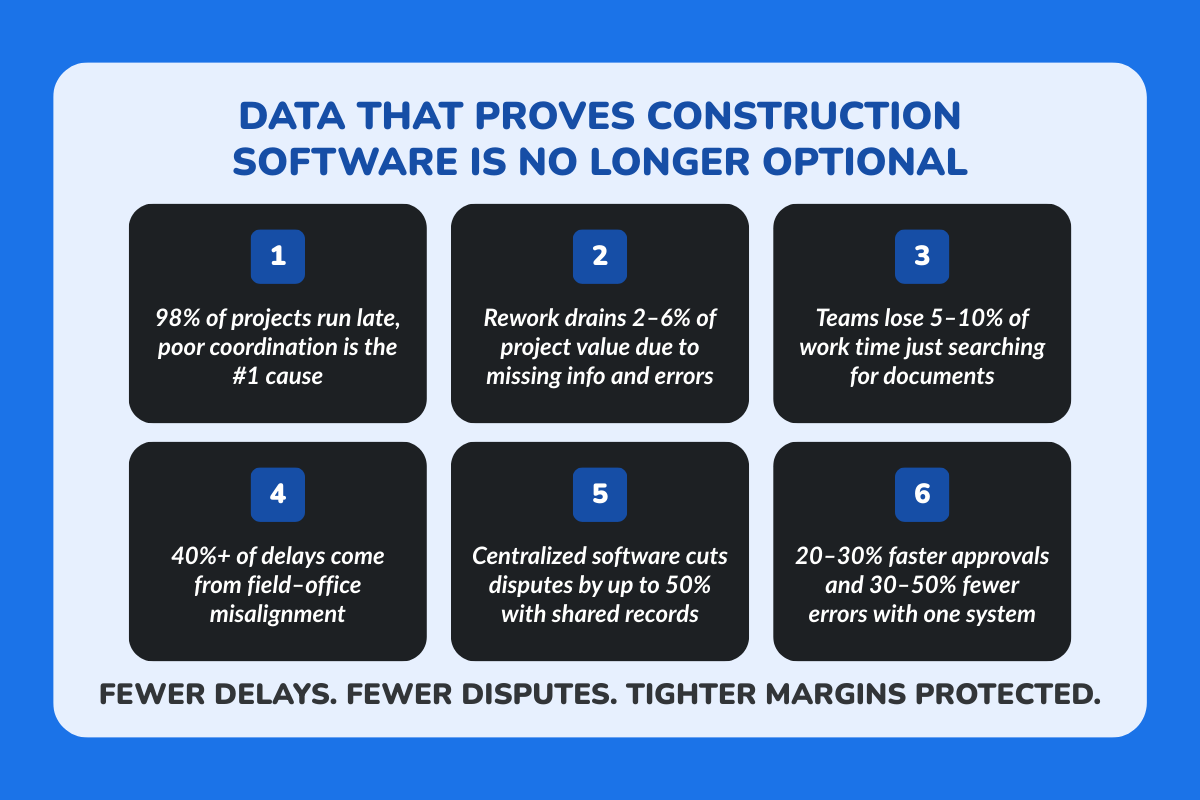
Construction projects face escalating pressures from labor shortages, rising costs, and coordination failures. Centralized software addresses these by streamlining communication, document access, and accountability, proven to reduce risks and improve outcomes.
1. Construction Industry Stats on Delays, Rework, and Cost Overruns
- 98% of projects experience delays, with poor coordination and supply chain issues as top causes; projects run 37% longer than planned on average.
- Rework costs 2–6% of total project value (up to $75 billion annually in the U.S.), driven by design errors, poor communication, and quality issues.
- Teams waste 5.5–10% of time (over 5 hours/week per professional) searching for documents like plans, specs, and emails due to fragmented systems.
- Labor shortages exacerbate overruns, with 40%+ of delays tied to coordination gaps between office, PMs, and field teams.
2. How Centralized Construction Project Software Reduces Risk
Centralized platforms cut disputes, speed approvals, and enhance visibility, directly tackling these pain points.
- Fewer disputes (up to 50% reduction) between general and specialty contractors through real-time shared documents and change logs.
- Faster approvals and change orders (20–30% quicker), minimizing delays from miscommunication and manual reviews.
- Better accountability across teams, with audit trails, automated notifications, and centralized dashboards, reducing errors by 30–50%.
Common Mistakes Construction Companies Make With Software
Many construction companies invest in software expecting instant control and efficiency, but results fall short when the basics are overlooked. The most common issues usually come down to how tools are chosen and used on the ground.
- Buying tools without fixing underlying processes: Software can’t repair broken workflows. When approvals, handovers, or reporting are unclear, even the best system turns into another layer of confusion.
- Ignoring site teams during tool selection: When field teams aren’t involved, tools feel impractical, slow, or disconnected from real site work, leading to low adoption and workarounds outside the system.
- Treating software as a one-time purchase: Construction software works best as a daily operating system. Without consistent use, training, and ownership, teams fall back to calls, spreadsheets, and WhatsApp threads.
How ConstructionBase Approaches End-to-End Construction Management?
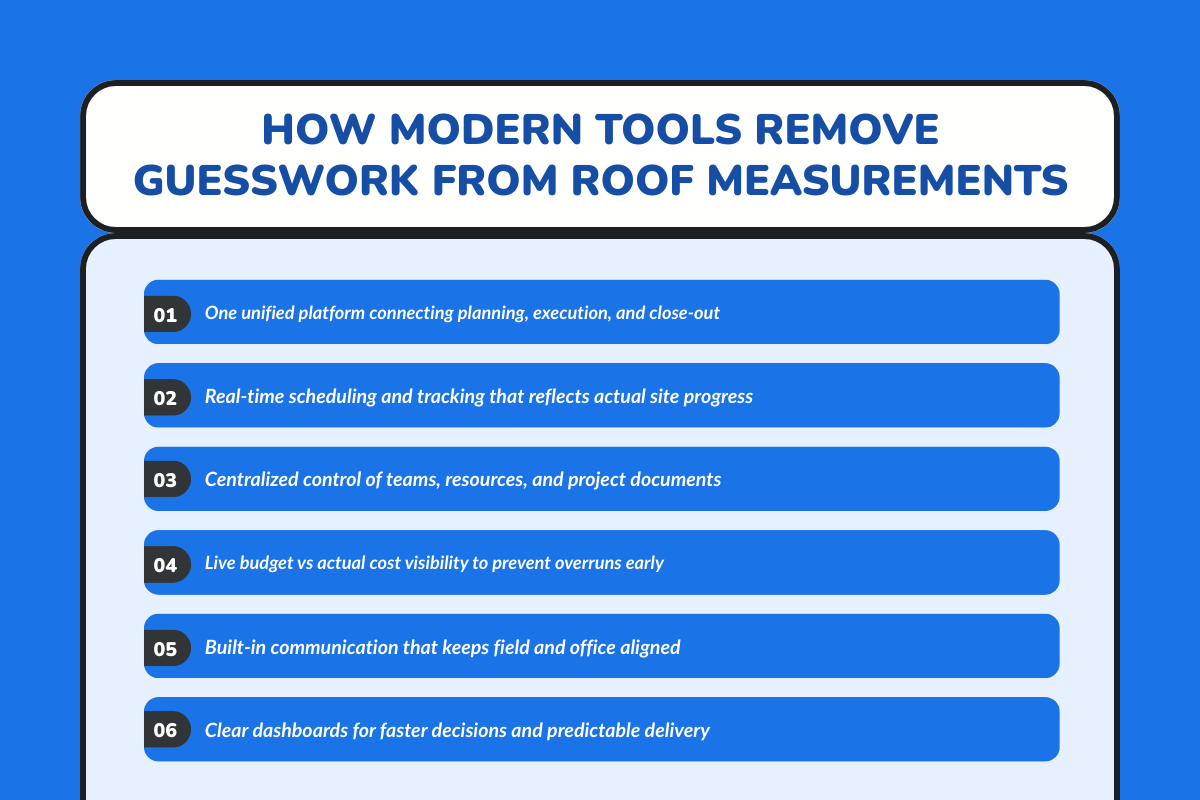
ConstructionBase doesn’t just add another set of disconnected tools; it unifies the way construction work actually gets done. Instead of treating planning, execution, and tracking as separate pieces, the platform brings everything together so your project teams don’t lose sight of what matters most: schedules, costs, communication, and progress across every stage of a build.
1. Built Around How Construction Work Really Happens
ConstructionBase is organized around the project, not just isolated modules. Every part of your workflow fits into one system:
- Scheduling and Tracking: You can create, update, and manage timelines with drag-and-drop controls that reflect real changes on the ground, not just pretty charts. This makes it easy to stay on time, whether your team is on a small renovation or a large commercial build.
- Resource and Team Management: Field crews, equipment, and materials are tracked in one place. Managers can assign tasks, balance workloads, and adjust assignments dynamically, reducing downtime and avoiding last-minute scrambling.
- Cost and Budget Control: Budgets and actual costs are monitored side by side in real time. You can catch overruns early, compare estimates to actual spending, and keep financial health visible from pre-construction through close-out.
- Document Management: All your blueprints, contracts, permits, and notes are stored securely in one location with version control, so everyone always sees the most current files, whether they’re on site or in the office.
2. Practical Visibility, Not Just Pretty Reports
What sets ConstructionBase apart is context: it delivers the right information to the right people at the right time.
- Real-Time Communication & Collaboration: Built-in messaging and update tools help teams, subcontractors, and clients stay in sync without endless email threads or confusion over versions.
- Risk Management: Potential issues are visible early, with tools that help identify risks before they become costly delays.
- Reporting & Analytics: Dashboards show project health across progress, team performance, and budgets so decisions are grounded in data, not guesswork.
By focusing on real project workflows, from planning and scheduling to execution, communication, risk control, and reporting, ConstructionBase helps teams stay organized, aligned, and in control at every phase of construction.
Final Thoughts:
The right software is not a magic wand; it doesn’t fix disorganization overnight. But it does give teams control, confidence, and predictability. For construction businesses managing multiple projects, cash flow, and daily operations, visibility is everything.
Rethink how you manage construction projects, choose tools that support real workflows, and watch productivity, cost savings, and team satisfaction improve.
About ConstructionBase
ConstructionBase is a project-centric construction management platform built for general contractors, specialty contractors, project managers, and office teams, offering end-to-end workflow clarity, centralized document management, real-time insights, and collaboration tools for modern construction projects.
Managing and streamlining your construction projects and taking control of costs is easier with the right platform. Schedule a personalized demo with our team today!
FAQs
1. Which is the best construction project management software?
The best construction project management software is one that fits how your team actually works, like ConstructionBase. It should help you manage projects from planning to close-out, track progress and costs in real time, and keep documents and communication in one place. For many construction teams, ease of use, mobile access, and clear visibility matter more than having too many features.
2. What software is commonly used in the construction industry?
The construction industry uses a mix of tools for project management, document management, estimating, scheduling, and communication. Some teams rely on spreadsheets and general project management tools, while others use dedicated construction software platforms. More companies are moving toward one platform that combines project tracking, documents, costs, and collaboration to reduce confusion and delays.
3. Can ChatGPT estimate construction projects?
ChatGPT can help explain cost factors, create sample estimates, or outline estimation steps, but it cannot replace construction estimating software or professional estimators. Accurate cost estimation depends on real project data, material prices, labor rates, and site conditions. Construction teams typically use built-in estimating software in all-in-one platforms like ConstructionBase alongside expert judgment for reliable project costs.
4. Which is the best software for construction project planning?
The best software for construction project planning allows teams to map tasks, timelines, and dependencies clearly while adjusting plans as work progresses. Tools with Gantt charts, real-time updates, and integration with cost and document management help project managers plan more effectively and respond quickly to changes on job sites.
5. How does construction project management software improve visibility?
Construction project management software improves visibility by showing progress, costs, tasks, and documents in real time across job sites and office teams. Instead of chasing updates through calls or emails, teams can monitor progress, review changes, and make informed decisions using shared, up-to-date project information.
6. Is construction project management software useful for small teams?
Yes, construction project management software can be useful even for small teams or single projects. It helps organize routine tasks, track time and costs, manage documents, and reduce miscommunication. As projects grow in size or complexity, having one system in place makes it easier to scale without losing control or visibility.
Have questions or need personalized advice?
Talk to an Expert Today and let our construction specialists guide you to success.
Related Posts
Building Construction Project Software: Key Integration Points You’re Missing





